
Download Muse – Free AI Text‑to‑Image Generator for Artists
Overview
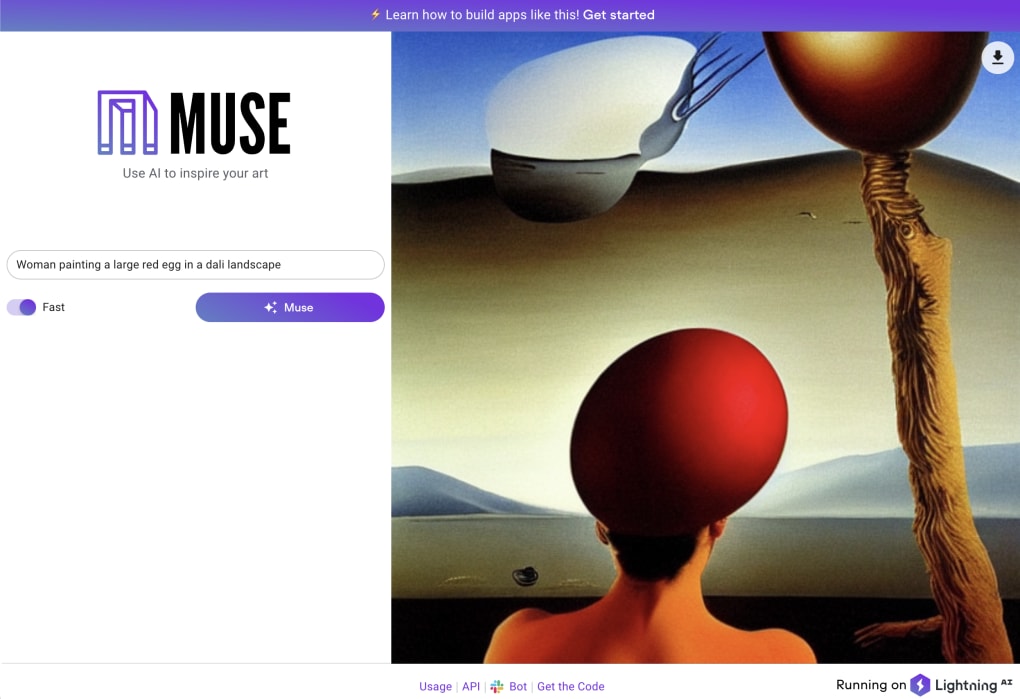
Muse is a web‑based AI text‑to‑image generator that lets creators turn simple prompts into striking visual artwork. Powered by Lightning.AI, Muse runs entirely in the browser, so there’s no need to install bulky software or manage GPU drivers. Users type a phrase—ideally a subject plus a desired style, such as “woman with umbrella in pointillism”—and within seconds the engine produces a single, high‑resolution PNG that reflects the requested aesthetic.
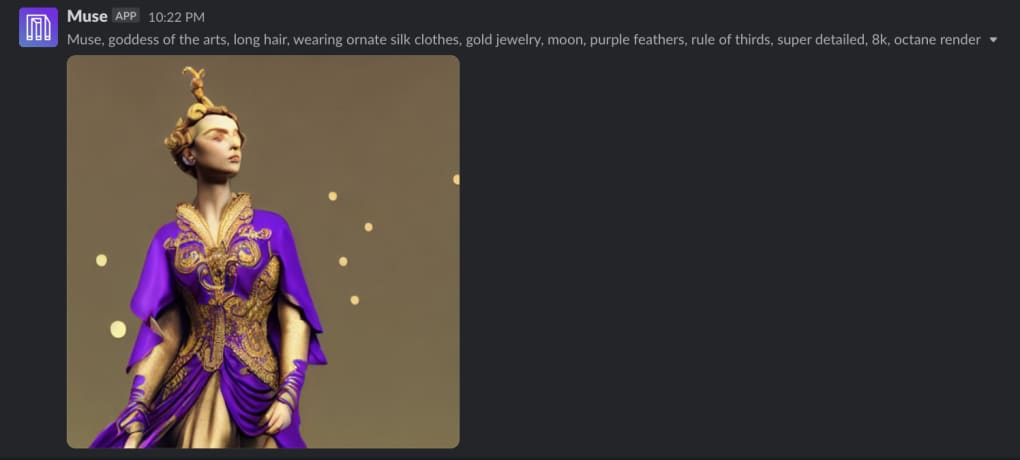
While similar tools like Craiyon generate multiple thumbnails, Muse focuses on delivering one image per request, prioritising anatomical correctness and photorealistic detail. The platform is free, supports any language, and offers two speed settings: a faster 1‑5‑second mode for quick sketches and a slower 5‑20‑second mode for richer, more detailed results. After generation, the image can be downloaded, shared, printed, or even posted directly to a Slack channel via the built‑in Slack Command Bot component.
Although occasional quirks appear—such as misplaced accessories or awkward cropping—Muse consistently produces art that respects the chosen style, making it a valuable source of inspiration for illustrators, designers, and hobbyists alike.
Key Features & How Muse Works
- Free, browser‑only access – no downloads or registration required.
- AI‑driven text‑to‑image generation powered by Lightning.AI.
- Support for multiple languages and custom art‑style descriptors.
- Two output speed options: “Fast” (1‑5 seconds) and “High‑Quality” (5‑20 seconds).
- Instant PNG download with lossless quality.
- Slack Command Bot integration for on‑the‑fly image creation in team channels.
- Automatic variation – each prompt yields a unique image, even when repeated.
- Responsive UI that works on desktops, tablets, and smartphones.
Behind the Scenes: The AI Engine
Muse leverages a diffusion model trained on millions of publicly available images. When you submit a prompt, the model interprets the textual cues, maps them to visual concepts, and iteratively refines a noise‑filled canvas until it matches the description. The “High‑Quality” mode applies more diffusion steps, resulting in finer details, smoother gradients, and better adherence to complex styles like baroque or impressionism. Conversely, the “Fast” mode reduces the number of steps, delivering a rougher but still coherent sketch—ideal for brainstorming sessions or rapid concept iterations.
Creative Use Cases
Because Muse produces a single, high‑resolution PNG, it’s perfect for:
- Concept art mock‑ups for game development.
- Mood‑board creation in advertising agencies.
- Educational illustrations for presentations.
- Personal art projects, prints, or social‑media posts.
Its Slack integration adds a collaborative layer: teams can request visual ideas without leaving their chat, fostering quick feedback loops and keeping creative momentum high.
Installation, Usage & Compatibility
Getting Started – No Installation Required
Since Muse runs fully in the cloud, the only “installation” step is opening the web app in a modern browser (Chrome, Edge, Firefox, Safari). Simply navigate to the Muse homepage, and you’ll see a clean interface with a large text box, a speed selector, and a “Generate” button. No plug‑ins, extensions, or accounts are necessary, which means you can start creating within seconds.
Step‑by‑Step Workflow
- Enter your prompt: Type a concise description, ideally combining a subject and an art style (e.g., “steampunk cityscape in watercolor”).
- Select output speed: Choose “Fast” for quick drafts or “High‑Quality” for detailed renders.
- Generate: Click the button and wait 1‑20 seconds while the AI renders the image.
- Review & download: The result appears in the preview pane. Use the download icon (top‑right) to save the PNG to your device.
- Share or integrate: Copy the image URL, embed it in documents, or trigger the Slack Bot command
/musefrom any channel.
Operating System Support
Muse is platform‑agnostic, working on Windows, macOS, Linux, Android, and iOS as long as the device runs a recent browser with JavaScript enabled. Because the heavy lifting happens on remote servers, even low‑end smartphones can generate images, though the “High‑Quality” mode may be slightly slower on slower connections.
Troubleshooting Tips
- If the image fails to load, refresh the page and try again—network hiccups are common with cloud‑based AI.
- For better results, include clear style keywords (e.g., “oil painting”, “pixel art”).
- When using Slack, ensure the Muse Bot has been added to your workspace and granted permission to post images.
Pros, Cons & Frequently Asked Questions
Pros
- Completely free and requires no installation.
- High‑quality, photorealistic output compared with many free generators.
- Fast generation options for rapid ideation.
- Slack integration streamlines team collaboration.
- Works on any modern browser, making it accessible on all major OSes.
Cons
- Generates only one image per prompt, limiting batch creation.
- Occasional visual artifacts such as misplaced accessories or cropped frames.
- No built‑in editing tools; users must rely on external software for post‑processing.
- Speed and quality depend on server load; peak times may cause slower responses.
FAQ
Is Muse really free, or are there hidden fees?
Muse is 100 % free for personal and commercial use. There are no subscription tiers or hidden charges. The only limitation is the server‑side usage policy, which may enforce reasonable rate limits to keep the service stable for everyone.
Can I use the images for commercial projects?
Yes. Images generated by Muse are provided under a royalty‑free license, allowing you to incorporate them into marketing materials, product designs, or printed artwork without attribution.
How does the Slack Bot work, and do I need a paid Slack plan?
The Slack Bot uses a simple slash command (/muse) that sends your prompt to Muse’s backend and returns the generated PNG directly into the channel. It works with any Slack workspace, free or paid, as long as the bot has been installed by an admin.
What image resolution does Muse provide?
Muse outputs images at a default resolution of 1024 × 1024 pixels in PNG format, which balances detail with manageable file size. Higher resolutions are not currently offered, but the PNG is lossless and can be upscaled with external tools if needed.
Why does the AI sometimes produce odd accessories, like an umbrella held with oven mitts?
The model learns from a broad dataset, which includes many mismatched or stylized examples. While Muse strives for anatomical correctness, occasional context errors can appear, especially with unusual combinations of objects. Refining the prompt or adding more detail often mitigates these quirks.
Structured Review
Muse delivers a compelling blend of accessibility and visual quality that few free AI generators match. Its browser‑only approach removes barriers, while the Slack integration adds a collaborative edge. Minor imperfections in composition are outweighed by the speed and artistic fidelity, making Muse a solid addition to any creator’s toolkit.
Rating: 4.5/5
Conclusion & Call to Action
For artists, designers, and anyone seeking instant visual inspiration, Muse stands out as a free, secure, and easy‑to‑use AI text‑to‑image generator. Its ability to interpret nuanced prompts, deliver photorealistic results, and integrate directly with Slack makes it more than a novelty—it’s a practical creative partner. While the single‑image output model limits batch workflows and occasional artifacts can appear, the overall experience is polished enough for professional use, especially when paired with a quick post‑processing step in Photoshop or GIMP.
Ready to explore limitless visual ideas without installing anything? Free download now, experiment with different styles, and bring your concepts to life in seconds. Join the growing community of creators who already rely on Muse for rapid prototyping, mood‑board creation, and collaborative brainstorming.



.png)



